বুধবার, ৬ মার্চ, ২০১৩

10 Myths about Startups

AppId is over the quota
Tweet Mar 4 2013 by Leo Widrich | Stumble Bookmark

Over the last two years of working at Buffer, I’ve come to learn that there are a few preconceived notions, stereotypes, clichés, and commonsense knowledge about startups that simply aren’t true.

I’d like to share some myths that I’ve discovered while working at a tech startup.

It’s hard to find companies, new or old, that don’t have deadlines. It’s in the business culture to set deadlines. And deadlines, on the surface, seem even more important in a newly launched Internet startup as a gauge of rapid progression.

And, honestly, in the beginning, we got sucked into thinking that deadlines were important to our success.

Here’s what we’d do: We’d set a deadline, work like crazy as the date arrives, and then, once the task is finally finished, we could relax.

As most of you probably already know, that never works when you’re trying to do something innovative and new; when you don’t have a manual to refer to on how to perform your tasks. And having deadlines didn’t make us happy either.

So, instead, we decided to apply the idea of pace. We help everyone on the team perform their work at a fast pace. We never try to build up to a big launch anymore.

At Balsamiq, we don’t have deadlines. Ever."

- Giacomo "Peldi" Guilizzoni, founder and CEO of Balsamiq Studios

This is may be the most obvious — and surprisingly still prevalent — myths about working at a company.

I have to admit that I was very skeptical about working in a remote team. My thinking went like this: "Yes, you can probably have a good team working remotely, but what about a great one?"

The truth is that you can build better remote teams than ever before, and most likely an even better one than having everyone in one place because you remove the geographical factor when you hire team members.

The people on the Buffer team live in Australia, U.S. and Europe.

I believe that embracing remote teams is one of the most important elements going forward.

"The technology to successfully run and manage remote teams has never been better."

- David Heinemeier Hansson, creator of Ruby on Rails and partner at 37signals

"WooThemes will always stay true to our remote roots."

- Adii Piernaar, co-founder of WooThemes

So, you’re a team of 4 or 6 or 10. The intuitive thinking in this situation is that company culture is a huge waste of time.

You’re small. You’re just starting out. What you need right now is users, marketing strategies, and beautiful code.

Who cares (or has time to think) about company culture?

Building a company culture from Day 1 was one of the most important elements in Buffer’s growth.

I remember that when I first got on board, Joel (the company’s founder) and I wrote a short document called "The personality of Buffer." This simple document helped us in staying aligned with our vision whenever new ideas or challenges came in.

Culture, I believe, should be solidly in place before any feature update, marketing campaign, significant code-writing, and so forth. It doesn’t have to be elaborate; it could be a short document like ours that guides you in the proper direction.

"If I could do it all over again, I would roll out our core values from Day 1."

- Tony Hsieh, chief executive of Zappos.com

One of the most common beliefs about the tech startup life is that it’s a miserable one.

You are spending day and night in the office, fueled by energy drinks and pizza, without anything else in your life going on.

We’ve found that discouraging crazy work hours and instead building up an incredibly solid daily routine is much more powerful.

What we do is in fact quite counterintuitive to the prevalent notion that work hours at a startup has to be long — we even ask people to go home even if they’re in a good flow!

You can’t sacrifice today for tomorrow.

"Happiness is not something you postpone for the future; it is something you design for the present."

- Jim Rohn, American entrepreneur, author and motivational speaker

Making money in the early stages of a startup is often equated to "You’re doing it wrong."

The thinking goes: If you’re focusing on monetization at the start, then you’re not putting all of your attention on growth, which is the most important thing for a startup.

On the contrary, there’s nothing better for a startup than making money early. And it’s not just for the obvious reasons.

"Charging for something is the best way to truly validate your idea," is a line from Joel, Buffer’s founder.

"Making money > Raising money."

- Hiten Shah, co-founder of Crazy Egg and KISSmetrics

This misconception about startup companies is similar to the one about needing deadlines.

The idea is often this: You’re a small startup, you need to outrun the competition and everything needs to happen quickly and in a hurry.

That’s a recipe for burning out and for making huge mistakes.

At our company, we try many things to create a balance between being fast-paced and not rushing our work.

One of the best ways to accomplish this, I’ve found, is with deliberate reflection. Recently we introduced "Daily Pair Calls" where two members of the team have a daily call to reflect and discuss their previous days. It’s a great way to slow down in order to speed up.

"Breaking things in right requires a certain amount of patience. You don’t want to push a new engine too hard. You certainly can’t sit still. And the last thing you need is to stall on the interstate."

- Todd Razor, founder of Three Razor

Here is another myth that definitely needs some explanation first.

We see that new CEO, VP or SVP being hired away from Google to Amazon, from Twitter to Facebook, and so on. And slowly a myth develops.

You can call it the "rockstar" myth.

The "rockstar" myth is the idea that the best engineers, marketers, designers, etc. are 10x better than us regular folks, and that these are the only people you need to be working with in a startup in order to ensure success.

But, at a startup, is it practical to focus your time and resources searching for that perfect "10x" programmer?

Wouldn’t you be missing out on working with many amazing people if you limited your options to that elusive "10x" designer that probably already works for someone else paying them much more than you can afford?

Instead, at our company, we evaluate candidates based on:

Do they fit our company’s culture?Do we have a real need for the person’s talent and skills right now?

However, if we find someone who is an exceptional fit to our company’s culture, we will still hire the person, even if the position isn’t immediately obvious.

"Your goal shouldn’t be to buy players, your goal should be to buy wins."

- From the movie, Moneyball

Another key misconception about working in a startup is that it involves sacrificing a few years of your life so you’re able to sell your company for a good profit and then live happily ever after.

You don’t need to sacrifice your health and happiness when you work at a startup.

A lot of our values and work at Buffer evolve around happiness. Everyone on the team has a daily call with another team member to discuss his or her daily improvement towards increased happiness, which I believe is important in maintaining a high level of productivity in our company.

"Instead of wondering when your next vacation is, you ought to set up a life you don’t need to escape from."

- Seth Godin, American entrepreneur, author and public speaker

So, you’ve read and understood Lean Startup. You decide you’re launching lean with your MVP until you find product market fit, doing all the customer development you can. And then you stop and revert to the "traditional" way of running a company when you’ve gotten a bit of a foothold in the industry.

That’s what we did near the beginning of our startup journey.

Instead, I think being lean should be a continual process, even well after you outgrow the title of "startup" and become a mega-huge company.

The most impressive case study of this is Eric Ries’s (the pioneer of Lean Startup) own company, IMVU. The company’s clear focus on lean throughout all processes is something we try to see as an amazing example to follow at our startup.

Another myth that we strongly aim to work against is that, as a startup, you have to keep your numbers under the hood.

After all, you’re a small company and if you share your innermost secrets, the competition will crush you!

We found the opposite to be true. We openly shared how we met each of our investors, how much revenue we are generating and have plans of turning into a full-fledged Open company over the next few months.

I believe that being transparent and sharing our progress has helped us gain goodwill with our users and also within the industry.

I’m sure that you could come up with lots more myths and misconceptions about startups.

Share your thoughts and experiences on the subject.

Leo Widrich is co-founder of Buffer, a better way to post to Twitter, Facebook and LinkedIn. He also blogs about insights on lifehacks, business and productivity on the Buffer blog. You can say “hello” to him on Twitter @leowid (he is a super nice guy).


View the original article here

মঙ্গলবার, ৫ মার্চ, ২০১৩

Learning From Cinema: What Sci-Fi Tells Interaction Designers About Gestural Interfaces

One of the most famous interfaces in sci-fi is gestural — the precog scrubber interface used by the Precrime police force in Minority Report. Using this interface, Detective John Anderton uses gestures to “scrub” through the video-like precognitive visions of psychic triplets. After observing a future crime, Anderton rushes to the scene to prevent it and arrest the would-be perpetrator.

This interface is one of the most memorable things in a movie that is crowded with future technologies, and it is one of the most referenced interfaces in cinematic history. (In a quick and highly unscientific test, at the time of writing, we typed [sci-fi movie title] + “interface” into Google for each of the movies in the survey and compared the number of results. “Minority Report interface” returned 459,000 hits on Google, more than six times as many as the runner-up, which was “Star Trek interface” at 68,800.)

It’s fair to say that, to the layperson, the Minority Report interface is synonymous with “gestural interface.” The primary consultant to the filmmakers, John Underkoffler, had developed these ideas of gestural control and spatial interfaces through his company, Oblong, even before he consulted on the film. The real-world version is a general-purpose platform for multiuser collaboration. It’s available commercially through his company at nearly the same state of the art as portrayed in the film.

Though this article references Minority Report a number of times, two lessons are worth mentioning up front.

Minority Report (2002)

Minority Report (2002)
Figures 5.6a–b: Minority Report (2002)

Hollywood rumor has it that Tom Cruise, the actor playing John Anderton, needed continual breaks while shooting the scenes with the interface because it was exhausting. Few people can hold their hands above the level of their heart and move them around for any extended period. But these rests don’t appear in the film — a misleading omission for anyone who wants to use a similar interface for real tasks.

Although a film is not trying to be exhaustively detailed or to accurately portray a technology for sale, demos of real technologies often suffer the same challenge. The usability of the interface, and in this example its gestural language, can be a misleading though highly effective tool to sell a solution, because it doesn’t need to demonstrate every use exhaustively.

The second lesson comes from a scene in which Agent Danny Witwer enters the scrubbing room where Anderton is working and introduces himself while extending his hand. Being polite, Anderton reaches out to shake Witwer’s hand. The computer interprets Anderton’s change of hand position as a command, and Anderton watches as his work slides off of the screen and is nearly lost. He then disregards the handshake to take control of the interface again and continue his work.

Minority Report (2002)

Minority Report (2002)

Minority Report (2002)

Minority Report (2002)
Figures 5.7a–d: Minority Report (2002)

One of the main problems with gestural interfaces is that the user’s body is the control mechanism, but the user intends to control the interface only part of the time. At other times, the user might be reaching out to shake someone’s hand, answer the phone or scratch an itch. The system must accommodate different modes: when the user’s gestures have meaning and when they don’t. This could be as simple as an on/off toggle switch somewhere, but the user would still have to reach to flip it.

Perhaps a pause command could be spoken, or a specific gesture reserved for such a command. Perhaps the system could watch the direction of the user’s eyes and regard the gestures made only when he or she is looking at the screen. Whatever the solution, the signal would be best in some other “channel” so that this shift of intentional modality can happen smoothly and quickly without the risk of issuing an unintended command.

What about other gestural interfaces? What do we see when we look at them? A handful of other examples of gestural interfaces are in the survey, dating as far back as 1951, but the bulk of them appear after 1998 (Figure 5.8).

Chrysalis (2007)

Lost in Space (1998)

The Matrix Reloaded (2003)

Sleep Dealer (2008)
Figure 5.8a–d: Chrysalis (2007); Lost in Space (1998); The Matrix Reloaded (2003); Sleep Dealer (2008)

Looking at this group, we see an input technology whose role is still maturing in sci-fi. A lot of variation is apparent, with only a few core similarities among them. Of course, these systems are used for a variety of purposes, including security, telesurgery, telecombat, hardware design, military intelligence operations and even offshored manual labor.

Most of the interfaces let their users interact with no additional hardware, but the Minority Report interface requires its users to don gloves with lights at the fingertips, as does the telesurgical interface in Chrysalis (see Figure 5.8a). We imagine that this was partially for visual appeal, but it certainly would make tracking the exact positions of the fingers easier for the computer.

Although none of the properties in the survey takes pains to explain exactly what each gesture in a complex chain of gestural commands means, we can look at the cause and effect of what is shown on screen and piece together a basic gestural vocabulary. Only seven gestures are common across properties in the survey.

The first gesture is waving to activate a technology, as if to wake it up or gain its attention. To activate his spaceship’s interfaces in The Day the Earth Stood Still, Klaatu passes a flat hand above their translucent controls. In another example, Johnny Mnemonic waves to turn on a faucet in a bathroom, years before it became common in the real world (Figure 5.9).

Johnny Mnemonic (1995)

Johnny Mnemonic (1995)

Johnny Mnemonic (1995)
Figure 5.9a–c: Johnny Mnemonic (1995)

To move an object, you interact with it in much the same way as you would in the physical world: fingers manipulate; palms and arms push. Virtual objects tend to have the resistance and stiffness of their real-world counterparts for these actions. Virtual gravity and momentum may be “turned on” for the duration of these gestures, even when they’re normally absent. Anderton does this in Minority Report as discussed above, and we see it again in Iron Man 2 as Tony moves a projection of his father’s theme park design (Figure 5.10).

Iron Man 2 (2010)

Iron Man 2 (2010)
Figure 5.10a–b: Iron Man 2 (2010)

To turn objects, the user also interacts with the virtual thing as one would in the real world. Hands push opposite sides of an object in different directions around an axis and the object rotates. Dr. Simon Tam uses this gesture to examine the volumetric scan of his sister’s brain in an episode of Firefly (Figure 5.11).

Firefly, “Ariel” (Episode 9, 2002)

Firefly, “Ariel” (Episode 9, 2002)
Figure 5.11a–b: Firefly, “Ariel” (Episode 9, 2002)

Dismissing objects involves swiping the hands away from the body, either forcefully or without looking in the direction of the push. In Johnny Mnemonic, Takahashi dismisses the videophone on his desk with an angry backhanded swipe of his hand (Figure 5.12). In Iron Man 2, Tony Stark also dismisses uninteresting designs from his workspace with a forehanded swipe.

Johnny Mnemonic (1995)

Johnny Mnemonic (1995)

Johnny Mnemonic (1995)
Figure 5.12a–c: Johnny Mnemonic (1995)

Users indicate options or objects with which they want to work by pointing a fingertip or touching them. District 9 shows the alien Christopher Johnson touching items in a volumetric display to select them (Figure 5.13a). In Chrysalis, Dr. Bru¨gen must touch the organ to select it in her telesurgery interface (Figure 5.13b).

District 9 (2009)

Chrysalis (2007)
Figure 5.13a–b: District 9 (2009), Chrysalis (2007)

Anyone who played cowboys and Indians as a child will recognize this gesture. To shoot with a gestural interface, one extends the fingers, hand and/or arm toward the target. (Making the pow-pow sound is optional.) Examples of this gesture include Will’s telecombat interface in Lost in Space (see Figure 5.8c), Syndrome’s zero-point energy beam in The Incredibles (Figure 5.14a) and Tony Stark’s repulsor beams in Iron Man (Figure 5.14b).

The Incredibles (2004)

Iron Man (2008)
Figures 5.14a–b: The Incredibles (2004), Iron Man (2008)

Given that there is no physical analogue to this action, its consistency across movies comes from the physical semantics: to make a thing bigger, indicate the opposite edges of the thing and drag the hands apart. Likewise, pinching the fingers together or bringing the hands together shrinks virtual objects. Tony Stark uses both of these gestures when examining models of molecules in Iron Man 2 (Figure 5.15).

Though there are other gestures, the survey revealed no other strong patterns of similarity across properties. This will change if the technology continues to mature in the real world and in sci-fi. More examples of it may reveal a more robust language forming within sci-fi, or reflect conventions emerging in the real world.

Iron Man 2 (2010)

Iron Man 2 (2010)
Figures 5.15a–b: Iron Man 2 (2010)

In the real world, users have some fundamental interface controls that movies never show but for which there are natural gestures. An example is volume control. Cupping or covering an ear with a hand is a natural gesture for lowering the volume, but because volume controls are rarely seen in sci-fi, the actual gesture for this control hasn’t been strongly defined or modeled for audiences. The first gestural interfaces to address these controls will have an opportunity to round out the vocabulary for the real world.

If these seven gestures are already established, it is because they make intuitive sense to different sci-fi makers and/or because the creators are beginning to repeat controls seen in other properties. In either case, the meaning of these gestures is beginning to solidify, and a designer who deviates from them should do so only with good reason or else risk confusing the user.

An important thing to note about these seven gestures is that most are transliterations of physical interactions. This brings us to a discussion of direct manipulation. When used to describe an interface, direct manipulation refers to a user interacting directly with the thing being controlled — that is, with no intermediary input devices or screen controls.

For example, to scroll through a long document in an “indirect” interface, such as the Mac OS, a user might grasp a mouse and move a cursor on the screen to a scroll button. Then, when the cursor is correctly positioned, the user clicks and holds the mouse on the button to scroll the page. This long description seems silly only because it describes something that happens so fast and that computer users have performed for so long that they forget that they once had to learn each of these conventions in turn. But they are conventions, and each step in this complex chain is a little bit of extra work to do.

But to scroll a long document in a direct interface such as the iPad, for example, users put their fingers on the “page” and push up or down. There is no mouse, no cursor and no scroll button. In total, scrolling with the gesture takes less physical and cognitive work. The main promise of these interfaces is that they are easier to learn and use. But because they require sophisticated and expensive technologies, they haven’t been widely available until the past few years.

In sci-fi, gestural interfaces and direct manipulation strategies are tightly coupled. That is, it’s rare to see a gestural interface that isn’t direct manipulation. Tony Stark wants to move the volumetric projection of his father’s park, so he sticks his hands under it, lifts it and walks it to its new position in his lab. In Firefly, when Dr. Tam wants to turn the projection of his sister’s brain, he grabs the “plane” that it’s resting on and pushes one corner and pulls the other as if it were a real thing. Minority Report is a rare but understandable exception because the objects Anderton manipulates are video clips, and video is a more abstract medium.

This coupling isn’t a given. It’s conceptually possible to run Microsoft Windows 7 entirely with gestures, and it is not a direct interface. But the fact that gestural interfaces erase the intermediaries on the physical side of things fits well with erasing the intermediaries on the virtual side of things, too. So, gesture is often direct. But this coupling doesn’t work for every need a user has. As we’ve seen above, direct manipulation does work for gestures that involve physical actions that correspond closely in the real world. But, moving, scaling and rotating aren’t the only things one might want to do with virtual objects. What about more abstract control?

As we would expect, this is where gestural interfaces need additional support. Abstractions by definition don’t have easy physical analogues, and so they require some other solution. As seen in the survey, one solution is to add a layer of graphical user interface (GUI), as we see when Anderton needs to scrub back and forth over a particular segment of video to understand what he’s seeing, or when Tony Stark drags a part of the Iron Man exosuit design to a volumetric trash can (Figure 5.16). These elements are controlled gesturally, but they are not direct manipulation.

Minority Report (2002)

Iron Man (2008)

Iron Man (2008)
Figure: 5.16a–c Minority Report (2002), Iron Man (2008)

Invoking and selecting from among a large set of these GUI tools can become quite complicated and place a DOS-like burden on memory. Extrapolating this chain of needs might very well lead to a complete GUI to interact with any fully featured gestural interfaces, unlike the clean, sparse gestural interfaces that sci-fi likes to present. The other solution seen in the survey for handling these abstractions is the use of another channel altogether: voice.

In one scene from Iron Man 2, Tony says to the computer, “JARVIS, can you kindly vacuform a digital wireframe? I need a manipulable projection.” Immediately JARVIS begins the scan. Such a command would be much more complex to issue gesturally. Language handles abstractions very well, and humans are pretty good at using language, so this makes language a strong choice.

Other channels might also be employed: GUI, finger positions and combinations, expressions, breath, gaze and blink, and even brain interfaces that read intention and brainwave patterns. Any of these might conceptually work but may not take advantage of the one human medium especially evolved to handle abstraction — language.

Gestural interfaces are engaging and quick for interacting in “physical” ways, but outside of a core set of manipulations, gestures are complicated, inefficient and difficult to remember. For less concrete abstractions, designers should offer some alternative means, ideally linguistic input.

Gestural interfaces have enjoyed a great deal of commercial success over the last several years with the popularity of gaming platforms such as Nintendo’s Wii and Microsoft’s Kinect, as well as with gestural touch devices like Apple’s iPhone and iPad. The term “natural user interface” has even been bandied about as a way to try to describe these. But the examples from sci-fi have shown us that gesturing is “natural” for only a small subset of possible actions on the computer. More complex actions require additional layers of other types of interfaces.

Gestural interfaces are highly cinemagenic, rich with action and graphical possibilities. Additionally, they fit the stories of remote interactions that are becoming more and more relevant in the real world as remote technologies proliferate. So, despite their limitations, we can expect sci-fi makers to continue to include gestural interfaces in their stories for some time, which will help to drive the adoption and evolution of these systems in the real world.

This post is an excerpt of Make It So: Interaction Design Lessons From Science Fiction by Nathan Shedroff and Christopher Noessel (Rosenfeld Media, 2012). You can read more analysis on the book’s website.

(al)

Christopher Noessel

In his day job as a Managing Director at Cooper, Christopher designs products, services, and strategy for a variety of domains, including health, financial, and consumer. In prior experience he’s been a small business owner, developed kiosks for museums, helped to visualize the future of counter-terrorism, built prototypes of coming technologies for Microsoft, and designed telehealth devices to accommodate the crazy facts of modern healthcare. His spidey sense goes off about random topics, leading him to speak about a range of things including interactive narrative, ethnographic user research, interaction design, sex-related interactive technologies, historical epochs in technology and ways to think about the coming one, free-range learning, and, most recently, the relationship between sci-fi and interface design in the book Make It So: Interaction Design Lessons from Science Fiction.

Yay! You've decided to leave a comment. That's fantastic! Please keep in mind that comments are moderated and rel="nofollow" is in use. So, please do not use a spammy keyword or a domain as your name, or it will be deleted. Let's have a personal and meaningful conversation instead. Thanks for dropping by!


View the original article here

Fresh Resources for Designers and Developers – March 2013

AppId is over the quota

It’s that time of the month again to share awesome tools and resources fit for designers and developers. This round we got plugins to help your site detect swipes and gestures as well as to enable mention input, a tool to creat your own stickman comics and a new tool to test your codes on Internet Explorer.

Check out all our fresh resources (according to month):

In our previous post, we have covered how to create your app icons with a third party tool. Alternatively, if you are like me, who prefer customizability, you can try App Icon Template.

his PSD template comes with Photoshop Action scripts that lets you convert your design into iOS-compatible formats on the fly, both for Retina or non-Retina devices.

Today, as there are more devices that are equipped with Touch Screen, you might want to consider enabling the multi-touch ability for your website. To do this, try Touch Swipe, a jQuery plugin that can detect swipes and finger gestures on your website. This plugin supports several gestures, including finger swipe, pinch, and zoom.

In previous post, Jake has shown you how to build Instagram instant search using Instagram API from scratch. There is also a ready-to-use jQuery plugin, like Spectagram.

Spectagram fetches the Instagram API and displays the result on your website or application. It currently supports displaying Instagram user feed, popular photos, and user-tagged photos.

MarkDown is a plain text formatting language that can be converted into HTML markup. We can write in MarkDown format with any code editor, or use a designated editor like Mou. Mou comes with syntax highlighting, auto save, powerful actions, auto pair, HTML and CSS export, etc.

The interface is neat and simple consisting of two columns. You can write the MarkDown format at the left, and see the result immediately on the right. Unfortunately, Mou is only available for OSX at the moment.

If you are using Twitter or Facebook, you are certainly familiar with Mention; we can include a friend’s name into a post or tweet, typically with a @ sign. If you want to (or need to) create such a functionality in your website, you can use a plugin named jQuery Mention Input.

To run this plugin, we need at least jQuery version 1.6 and Underscores.js. For more technical details, head over to this page.

Blokkfont is a font for mock-ups and wireframing that contains only block and rectangular characters as previewed in the following screenshot. If you are against using conventional Lorem Ipsum, this font is a really good alternative. It is available as a desktop font (in .ttf) and webfont.

You don’t have to good at drawing to create a comic. You can simply use Cmx (read Comix), a web based editor for creating xkcd style comic stripe. The comic graphical output will not be an image like in a traditional comic, instead it is built with HTML and SVG.

Roole is a JavaScript-based CSS Pre-processor. It has a list of features that are inspired by other CSS preprocessor (LESS, Sass and Stylus) such as Nesting Rules, Indentation, Variables, Mixins, Functions, Operation, and Extending style rules (like in Sass). Roole also provides built-in vendor prefixes, so we can write complex CSS3 rules in a simple way.

Hint is a CSS library containing a set of styles rules for creating a simple tooltip. The tooltip is built with CSS3 Transition, CSS3 property, pseudo-element, and data attribute. It is a good alternative to JavaScript-based tooltip. Head over to the following page to see it in action: Hint.css Demo

Testing websites for Internet Explorer has always been unpleasant, as IE has several versions that have their own quirks and behaviour. Fortunately, Microsoft realizes this and has introduced a tool to make the web developer’s job less painful with Modern.ie.

Modern.ie is a set of tools for testing websites in Internet Explorer, in old and modern versions. It will scan the webpage to find compatibility issues and return suggestions to fix the issues.

Graphic & web designer; having been about 2 years working as a freelance designer specializing in e-Commerce for retail industries. He also shares his enthusiast in web design at creatiface.com and can be contacted on Twitter @creatiface


View the original article here

Freebie: 10 Instagram Photoshop Actions

AppId is over the quota

These are the first Photoshop actions by SparkleStock and they make your photos look like it was shot with Instagram.

Instant Hipster - 10 Retro Photoshop Actions

This free download gives you access to 10 Photoshop actions. If you’re a SparkleStock member, you get access to all 19 of them!

10 Retro Effects

This Photoshop action set creates snapshots so that you can instantly switch between the effects with one click – a huge time saver.

Instant Previews with Snapshot Rendering

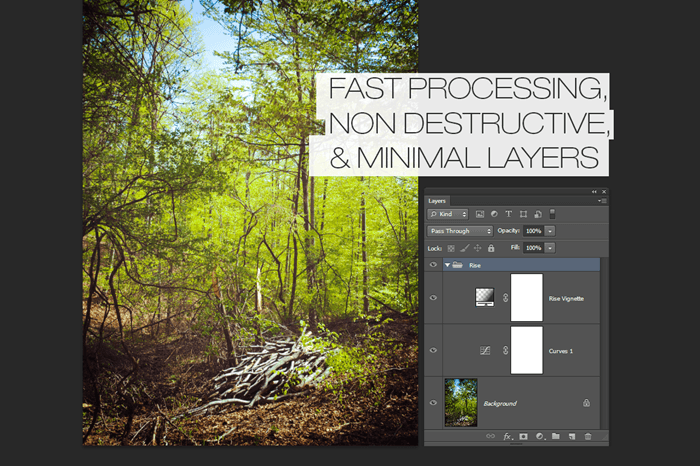
Try these actions and you’ll be surprised how few layers it creates – most only use 2 layers! You will not find a raster layer in here – even some of the tricky vignettes are smartly created using a combination of gradients. This is a much harder way to create photo effects but the benefits are faster processing and maximum image quality.

Fast processing, nondestructive, and minimal layers

These actions can easily be toned down by adjusting the opacity. They’re great for wedding photos, corporate shots, and more. Want something new? Try combining any two actions for even more effects!

Easily lower the opacity for a more natural look

See how easy to use these Photoshop actions are! The actions shown in the video are from the SparkleStock version which contains 19 instead of 10 actions.

Instant Hipster - 10 Retro Photoshop Actions Instant Hipster - 19 Retro Photoshop Actions

View the original article here

Carry 2 SIM Cards In 1 iPhone With The SIM+

AppId is over the quota

There are some of us who have more than one phones to our name. One could be for work, assigned by the company we work for, and the other for our personal use, to keep track of family and friends. It’s a bit of a hassle to be carrying two phones around. The margin for error increases when you are travelling.

If however you hold an iPhone, here’s where you can use two lines in one iPhone. The SIM+, is developed by Sumchi & TJ from Digirit, and it lets you carry two SIM cards in the same iPhone.

It actually comes in as a protective casing for your iPhone 5 but with an extension that allows you to switch between two SIM cards in your iPhone.

how the sim+ looks on iphone 5

The casing that covers the side and back part of the iPhone is made out of plastic while a layer of anodized finish aluminum covers the SIM cards portion, protecting it from external harm.

break down of the sim+ casing

You can insert a nano SIM card in the first slot and a micro SIM card on the second slot. If you want to insert two nano SIM cards instead, this is possible as The SIM+ comes with a nano-to-micro adapter.

how the sim card part looks like

It takes around 45 to 60 seconds for your iPhone to detect and receive reception when you first insert the SIM cards.

Now, here is how it works. You can’t receive incoming messages or calls from both SIM cards simultaneously. A timed interval option is built into the system to let you switch between the two cards.

The SIM+ will alternate in between SIM cards to check for messages/calls.

the sim application in settings

For now, The SIM+ is only available for iPhone 5. The creator require pledges for $30,000 for the production of The SIM+, and as of right now it has up to $2400 by 39 backers. By pledging The SIM+ for $52 now, you’ll received one set of The SIM+ around May 2013, if this project gets funded through.

This post is published by a Hongkiat.com staff (editors, interns, sometimes Hongkiat Lim himself) or a guest contributor.


View the original article here